Get In-Demand Finance Certifications
Download our free t-account template
This T-Account template helps you organize and balance the debits and credits for your transactions and journal entries. Use this template to visualize the accounting perspective of how transactions affect a business’ different accounts.
Here is a preview of what the t-account template looks like:
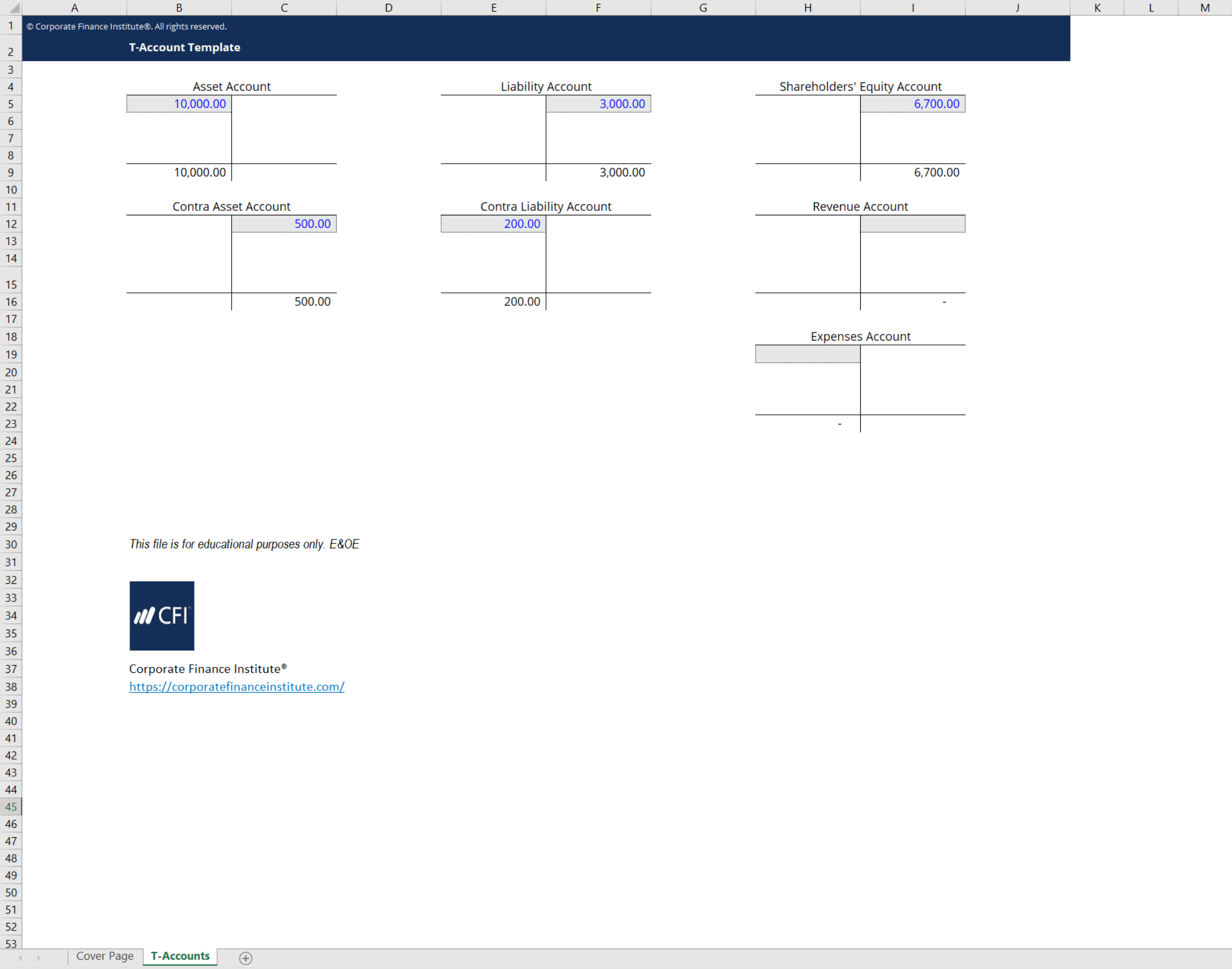
T-Accounts are a graphical representation of individual accounts on a company’s ledger. They are shaped like a ‘T’ to help visualize how transactions, debits, and credits affect a company’s accounts. By graphically showing the debits and credits, t-accounts help determine what type of account each individual item is and how a transaction changes its balance.
For example, by looking at the t-account template preview above, you can see an asset account and a liability account. You will notice that asset accounts primarily hold a balance on the left of the t-account. Conversely, liability accounts hold a balance on the right. This is because asset accounts hold a debit balance while liability accounts maintain a credit balance.
Building on this example, we can look at how a transaction would affect an asset account and a liability account. Consider a transaction where the company purchases $1,000 of equipment on credit. This would affect the above t-accounts like so:

As you can see, the equipment account is an asset account so the balance is depicted on the left as a debit balance. Conversely, the accounts payable account is a liability account so the balance is shown on the right. Using t-accounts is a great way to understand and keep track of journal entries! Use CFI’s t-account template to make this even easier!
Connect what you just learned to a clear career path with CFI’s role‑based courses and certification programs.
Thank you for reading CFI’s guide to the T-Account Template. For more resources, check out our business templates library to download numerous free Excel modeling, PowerPoint presentations, and Word document templates.
To master the art of Excel, check out CFI’s Excel Crash Course, which teaches you how to become an Excel power user. Learn the most important formulas, functions, and shortcuts to become confident in your financial analysis.
Launch CFI’s Excel Crash Course now to take your career to the next level and move up the ladder!